Every Night, We Identify What Needs Fixing First
Every night, ITDash checks the software and versions installed on your computers and servers against known vulnerabilities. Instead of handing your team thousands of technical findings, it groups them by the update that resolves them and highlights vulnerabilities already being used in real attacks. Once a fix is applied, the finding stays open until a follow-up check confirms that it has worked.
From the first finding to a verified fix
See what is still open, what is being fixed and what has been verified
The ITDash vulnerability screen brings findings from computers and servers into one place and groups them by the fix required. It shows what remains open, what is currently being addressed and what has been confirmed as resolved during the follow-up check.
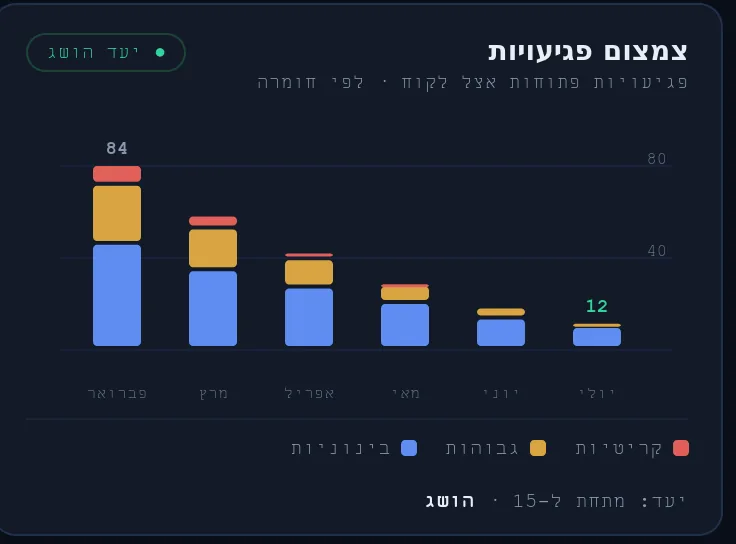
Clear rules for how findings are handled
A vulnerability should not disappear from a report simply because an update was sent. Our process keeps the finding open until the result has been checked, while servers and sensitive applications receive the separate attention they require.
Monitoring is useful when someone takes responsibility for what it finds
A long vulnerability report can create more work without making the business safer. Someone still has to decide what is urgent, identify the update that resolves each finding, recognise where an automatic change would be risky and check that the fix actually worked.
ITDash gives our team the information needed to make those decisions. It turns raw findings into an organised remediation plan that reflects the computers, servers and software used by the business.
For monthly managed service clients, remote remediation is included. The SrvIT team already responsible for the IT environment reviews the findings, approves the appropriate actions and follows them through to verification.
Vulnerability monitoring is also available to businesses with an internal IT team or another service provider. We can provide a structured view of the findings and priorities so that the existing team can carry out the work. If you would like SrvIT to handle remote remediation as well, it is available as an additional paid service.
The arrangement depends on how your IT is already managed. We can take responsibility for monitoring and remediation, or give your existing team a clearer, more practical basis for its work.
From connecting the systems to confirming the result
A monitoring agent is installed on the systems covered by the service. It reports the installed software and versions to ITDash, where known vulnerabilities can be identified and tracked.
ITDash collects fresh data every night. Findings are grouped by the fix they require, while vulnerabilities being actively exploited or considered more likely to be exploited move higher on the list.
For managed service clients, the SrvIT team reviews the findings and carries out remote remediation. With the standalone monitoring service, the organised remediation list can be passed to your internal IT team or current provider. SrvIT can also carry out the remediation as an additional paid service.
The team previews an update before approving it. Open applications are given time to close, Windows updates wait until the computer is idle, and servers are handled one at a time.
Questions about vulnerability monitoring and remediation
What is vulnerability monitoring?
Vulnerability monitoring checks the software and versions installed on computers and servers, then identifies known security weaknesses affecting them. ITDash groups the findings by the updates or actions required, so the result is a practical remediation list rather than a long set of technical codes.
Can we use the service without moving our IT management to SrvIT?
Yes. Vulnerability monitoring is available as a standalone service and can work alongside your internal IT team or current provider. If you would also like SrvIT to carry out remote remediation, that can be added as a separate paid service.
What is included for SrvIT managed service clients?
Remote remediation is included for monthly managed service clients. Our team reviews the findings, approves the appropriate actions, carries out the work remotely and checks the results.
Will the updates interrupt our work?
The process is designed to avoid unnecessary disruption. Updates run at low priority. If an application is open, the update waits until it closes and then tries again. Windows updates begin only after the computer has been idle for 10 minutes, and the computer is not restarted automatically.
Is every application updated automatically?
No. Software such as VPN applications and remote access tools is placed on an exceptions list and reviewed separately. Servers are also excluded from blanket updates. Each server is handled individually.
How do you know whether the fix worked?
We do not close a finding just because an update reports that it has finished. During the next nightly collection, ITDash checks the computer or server again. The finding is closed only when the vulnerability is no longer detected.
Would you like a clearer view of the vulnerabilities in your systems?
Tell us roughly how many computers and servers you have, and who currently looks after them. We can then discuss the arrangement that fits your business: vulnerability monitoring within SrvIT's monthly managed service, cooperation with your internal IT team or existing provider, or monitoring as a standalone service.